How to prepare a clinical bowel symptom log for your gastroenterologist
How to format your stool habits, pain trends, and red flags into a clinical report that doctors can review in under two minutes.
Gastroenterologists have roughly 15 minutes per appointment. They cannot read raw diary entries or browse photos on your phone. They need four specific metrics: your Bristol stool distribution percentages, your weekly pain and urgency averages, your dietary correlations, and any clinical red flags like rectal bleeding, tarry stools, or nocturnal bowel movements.
Summary of steps in this guide
- 1Track at least 14 to 30 consecutive days
One week of data does not capture cyclical bowel patterns. A 30-day window provides statistically reliable motility averages.
- 2Classify every bowel movement by Bristol type
Record every stool form from Type 1 to Type 7. Calculate the percentage of constipation vs normal vs loose stools.
- 3Score pain, urgency, and evacuation completeness
Quantify symptoms using numeric scales (pain 0 to 10, urgency 1 to 5, incomplete evacuation rates).
- 4Isolate clinical red flags
Separate benign IBS symptoms from alarm signs like persistent rectal bleeding, unexplained weight loss, or black stools.
- 5Format findings into a one-page clinical summary
Present aggregated graphs and tables rather than chronological narrative notes so your physician can spot patterns instantly.
The average gastroenterology consultation lasts between 12 and 18 minutes. In that short window, your physician must review your medical history, evaluate your symptoms, determine a differential diagnosis, and decide on diagnostic tests or treatments.
Handing a doctor a 40-page handwritten diary or asking them to scroll through notes on your smartphone wastes valuable consultation time.
To get an accurate diagnosis, you must speak your doctor's language: standardized clinical scores and aggregated summaries.
What doctors actually look for in bowel data
Gastroenterologists do not evaluate your symptoms as isolated stories. They classify your case into clinical phenotypes:
- IBS-C (Constipation-predominant): More than 25% of bowel movements are Bristol Type 1 or 2, and fewer than 25% are Type 5, 6, or 7.
- IBS-D (Diarrhea-predominant): More than 25% of bowel movements are Bristol Type 5, 6, or 7, and fewer than 25% are Type 1 or 2.
- IBS-M (Mixed bowel habits): More than 25% of bowel movements are constipation, and more than 25% are diarrhea.
- Pelvic floor dyssynergia: Normal stool consistency (Bristol Type 3 or 4) combined with high straining scores and incomplete evacuation sensations.
If you describe your symptoms vaguely as "my stomach hurts and my digestion is unpredictable," the doctor cannot determine which phenotype you have. Providing objective metrics speeds up your diagnosis.
The 5 steps to building a doctor-ready symptom log
Step 1: Track at least 14 to 30 consecutive days
Symptom severity varies across days of the week, work schedules, and menstrual cycles. A 30-day tracking period ensures that random events do not distort your overall pattern.
Log every visit to the bathroom, including false alarms where you felt an urgent need but could not pass stool. In clinical terms, this urge without evacuation is called tenesmus, and it is a key diagnostic marker.
Step 2: Classify every movement using the Bristol Stool Scale
The Bristol Stool Form Scale is the worldwide clinical standard:
- Types 1 and 2: Slow transit through the colon
- Types 3 and 4: Healthy transit time
- Types 5, 6, and 7: Rapid transit and insufficient water absorption
Calculate your percentage breakdown. For example: 15% Constipated, 60% Normal, 25% Diarrhea. This simple ratio gives your doctor an immediate overview of your motility profile.
Step 3: Quantify pain and urgency on standardized scales
Replace subjective words like "bad cramps" with numeric scales:
- Abdominal pain: Rate from 0 (no pain) to 10 (worst imaginable pain).
- Urgency: Rate from 1 (can delay indefinitely) to 5 (immediate risk of incontinence).
- Straining and completeness: Rate whether evacuation felt complete on a 1 to 5 scale.
Step 4: Isolate clinical red flags
Your doctor must rule out inflammatory bowel disease (IBD), celiac disease, or colorectal malignancies before diagnosing functional disorders like IBS.
Explicitly track and highlight any of the following alarm symptoms:
- Visible blood in the stool or on toilet paper
- Black, tarry stools (which indicate upper gastrointestinal bleeding)
- Unexplained weight loss
- Fever accompanying gastrointestinal episodes
- Waking up in the middle of the night to have a bowel movement (nocturnal diarrhea)
Step 5: Format findings into a one-page summary
Do not print raw chronological tables. Structure your document into distinct sections:
- Overall summary: Total entries, predominant Bristol type, average pain, average urgency.
- Clinical alerts: Clear callout confirming the presence or absence of blood and mucus.
- Top symptoms: Bar chart showing frequencies of bloating, cramping, nausea, or gas.
- Weekly trends: Grouped metrics comparing week 1 through week 4.
- Notable entries: A filtered table isolating only the days with high pain (>= 7), severe urgency (>= 4), or abnormal stool form.
How GutLog 1.5.6 automates your doctor report
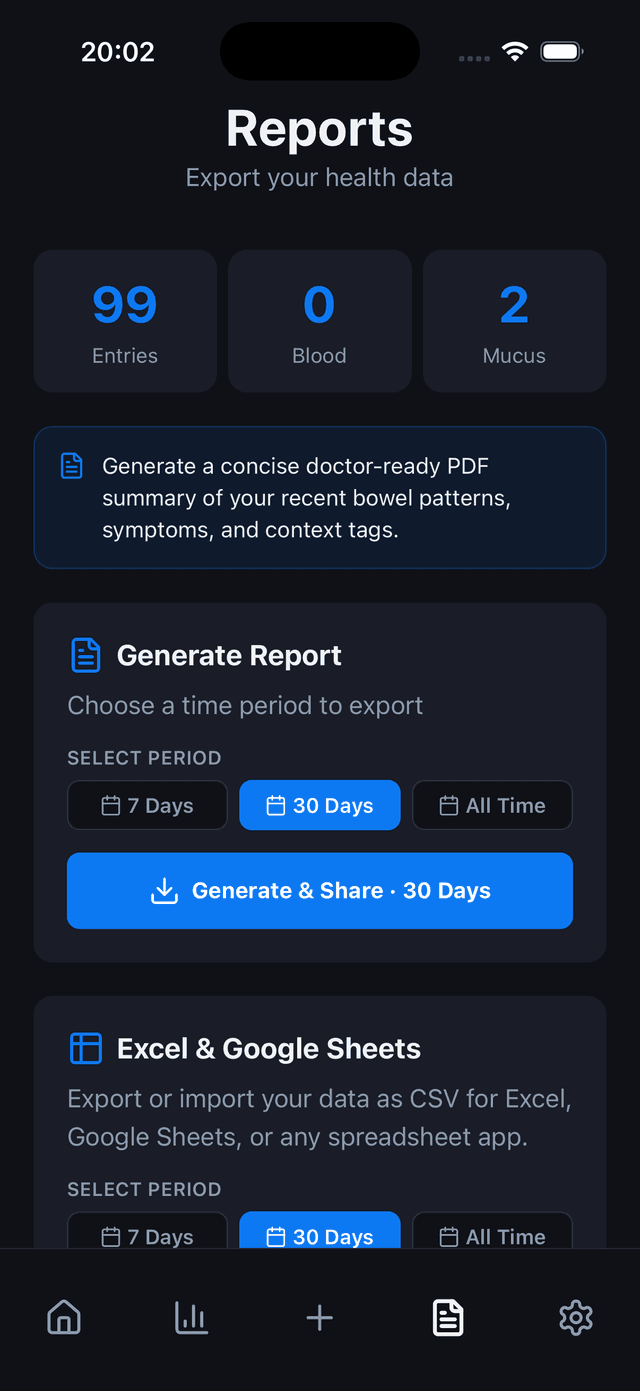
Creating this clinical report manually takes hours of data entry and graphing. GutLog generates it in one tap:
- A4 PDF report generator. GutLog formats your logs into a clean, printable PDF designed specifically for clinical reviews.
- Red-flag clinical alerts. If you log blood or tarry stools, the report places an alert block at the top so your doctor spots it immediately.
- Weekly summary cards. The app aggregates your entries into Sunday-to-Saturday blocks showing Bristol distributions, pain trends, and symptom frequencies.
- Notable entries table. Instead of listing hundreds of normal days, GutLog highlights your most severe events with custom stool color swatches, pain scores, and patient notes.
- Print or share via iOS. Export your PDF directly to your printer or share it to your healthcare provider's secure patient portal.
Automate this protocol with GutLog 1.5.6
Tracking symptoms and calculating statistical correlations on paper or spreadsheets takes hours, introduces memory bias, and cannot detect multi-hour transit delays.
GutLog compiles your logs into an A4 clinical summary with Bristol distribution charts, weekly averages, red-flag alerts, and a notable entries table.
- Evaluates 6 digestion lag windows (2, 4, 8, 12, 24, 36 hours)
- Calculates Poisson arrival baseline rates and lift scores
- Generates doctor-ready A4 PDF reports in one tap
- Operates 100% on-device with zero cloud health tracking
Frequently asked questions
What does a gastroenterologist want to see in a symptom log?
Physicians look for your predominant Bristol stool type, stool frequency per day, pain and urgency averages, and whether symptoms correlate with meals or stress. They also look for red-flag symptoms that warrant an immediate colonoscopy or blood work.
Should I show pictures of my stool to my doctor?
No. Gastroenterologists prefer standardized clinical metrics based on the Bristol Stool Chart. Photographs are inconsistent due to bathroom lighting, bowl dilution, and angles.
How long should I track symptoms before seeing a GI specialist?
A minimum of 14 days is necessary to establish initial patterns, while 30 days provides sufficient data to rule out short-term viral infections and evaluate hormonal or dietary cycles.
Start tracking your digestive health today
Download GutLog for iPhone. Free to start, no account required, completely private.
Download on the App Store